Why teams leave WordPress
WordPress can do almost anything, but every extra feature tends to arrive as another plugin. Over time the site gets harder to update, slower to load and riskier to change.
Page builders, form plugins, SEO plugins and caching all need updating, and one clash can take a page down. Small edits end up waiting for whoever looks after the site.
I’ll replace that plugin stack with Webflow’s built-in CMS, forms, SEO settings and hosting, then move your content across so nothing is lost along the way.
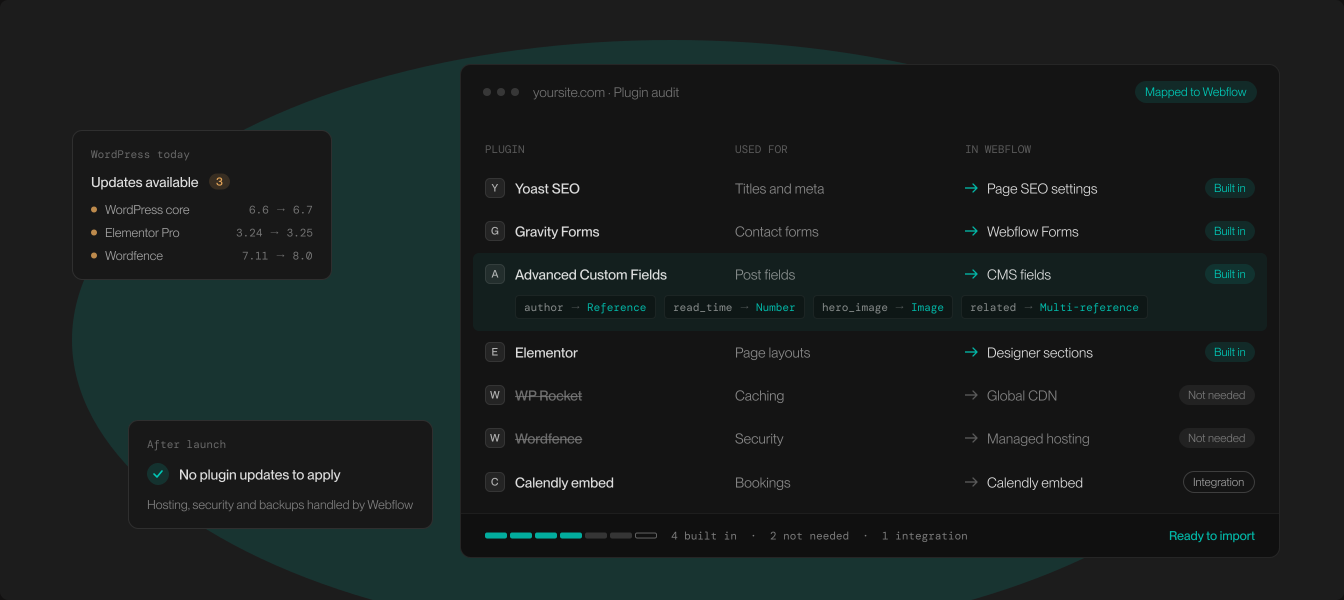

What comes across from WordPress
Your posts, pages and search visibility moved into a Webflow site your team can manage.
Posts and custom post types
Blog posts, case studies and any custom post types mapped to Webflow CMS collections, with categories, authors and featured images kept.
Yoast and Rank Math settings
SEO titles, meta descriptions and social images carried over, with 301 redirects for every URL that changes.
Forms and integrations
Gravity Forms or Contact Form 7 rebuilt as Webflow or HubSpot forms, with analytics and tracking reconnected.
Custom fields and page builder layouts
Advanced Custom Fields become structured CMS fields, and Elementor or Divi layouts are rebuilt as clean, reusable sections.
How it works
Audit your WordPress site
I’ll export your content, list every plugin and what it does, and agree what Webflow handles natively and what needs an integration.
Rebuild and import in Webflow
I’ll build the agreed designs, set up CMS collections that match your post types and import your content, checking each page as I go.
Redirect, launch and switch off
I’ll map redirects from every old URL, launch on your domain and help you retire the old WordPress hosting.
Is this the right fit?
This is for teams running a marketing site on WordPress who want fewer moving parts and more control over everyday updates.
- Replace a long list of plugins with built-in features.
- Stop applying core, theme and plugin updates.
- Keep your posts, rankings and lead flow.
- Let marketing publish pages without waiting on a developer.
- Move off shared or managed WordPress hosting.
If your site runs WooCommerce, a membership area or a large multilingual setup, we’ll talk through what Webflow can take on and what’s better kept elsewhere.
FAQs
How do you migrate a WordPress site to Webflow?
A WordPress to Webflow migration has five stages: audit the current site, build the new pages in Webflow, import content into Webflow CMS collections, set up 301 redirects, then launch on your domain. Posts and custom post types are exported from WordPress, cleaned and imported into matching collections. Page layouts are rebuilt rather than copied, because Webflow doesn’t use WordPress themes or page builders.
Will moving from WordPress to Webflow hurt my SEO?
Not if the migration is planned around your existing URLs and content. Rankings usually drop when URLs change without redirects or when titles and copy are lost. I carry over every page title, meta description and heading, keep URLs the same where Webflow allows, and add a 301 redirect for any that change. After launch I submit the new sitemap in Google Search Console and check for crawl errors.
Can I keep my WordPress URLs in Webflow?
Mostly, yes. Static pages can keep the same paths using Webflow folders. CMS items always sit under a collection path, so a post at /my-post/ on WordPress becomes /blog/my-post/ in Webflow. Every URL that changes gets a 301 redirect, which sends visitors and search engines to the new page and passes on its ranking signals.
What happens to my WordPress plugins in Webflow?
Most WordPress plugins aren’t needed in Webflow because the features are built in. SEO fields, forms, hosting, SSL, caching and backups all come with Webflow, so plugins like Yoast, Contact Form 7, WP Rocket and UpdraftPlus can be retired. For features Webflow doesn’t cover, such as bookings or live chat, I add a dedicated tool through an embed or integration.
Can Webflow handle custom post types and Advanced Custom Fields?
Yes. Each WordPress custom post type becomes a Webflow CMS collection, and Advanced Custom Fields map to Webflow field types such as plain text, rich text, image, number, date, reference and multi-reference. Repeater and flexible content fields have no direct equivalent, so they’re planned during the audit and usually rebuilt as linked collections or reusable components.
Can you rebuild Elementor, Divi or Gutenberg pages in Webflow?
Yes, but they’re rebuilt rather than converted. Page builder markup doesn’t transfer to Webflow, so I recreate each layout as clean, reusable sections built on a consistent class system. The result is lighter code, faster pages and a site your team can edit without breaking the layout.
Is Webflow better than WordPress for a B2B marketing website?
For most B2B marketing sites, Webflow is simpler to run. It combines visual design, CMS, hosting and security in one platform, so there are no plugins or core updates to manage, and marketers can publish pages without a developer. WordPress can still be the better fit for large ecommerce stores, membership sites or projects that rely on specific plugins.
Can I move a WooCommerce store to Webflow?
Webflow has built-in ecommerce that suits smaller catalogues with straightforward products. Stores that rely on subscriptions, complex shipping rules or lots of WooCommerce extensions are usually better on a dedicated platform such as Shopify, with the marketing site in Webflow linking to the shop. I’ll recommend the right setup during the audit.
How long does a WordPress to Webflow migration take?
It depends on the number of pages, post types and how much content needs tidying before it moves. A brochure site with a short blog moves faster than one with hundreds of posts and several custom post types. You’ll get a clear timeline after I’ve audited your WordPress site and agreed what’s coming across.
Can my team edit the site after moving to Webflow?
Yes. Webflow lets your team update text, images and blog posts directly on the page, without touching the design or code. I set up reusable components and CMS collections so new pages stay on brand, and hand over a short guide covering everyday edits and publishing.
“We launched a new specialist, boutique tax advisory business in March 2025 and Matt created our website. Matt’s service and end product was exceptional, meeting with our design and timing requirements and being highly responsive during the process. Would highly recommend.”
James PilbeamLumentis Partners


