Why teams move from Framer
Framer makes beautiful sites fast, but as content and teams grow, many need more structure underneath: related CMS content, clearer publishing roles and a build more people can extend safely.
Larger collections, content that links across the site and more people editing at once can be harder to manage, and design changes can ripple across pages in ways that are hard to track.
I’ll recreate your Framer design in Webflow, structure your content into related CMS collections and set up roles so your team can publish with confidence.
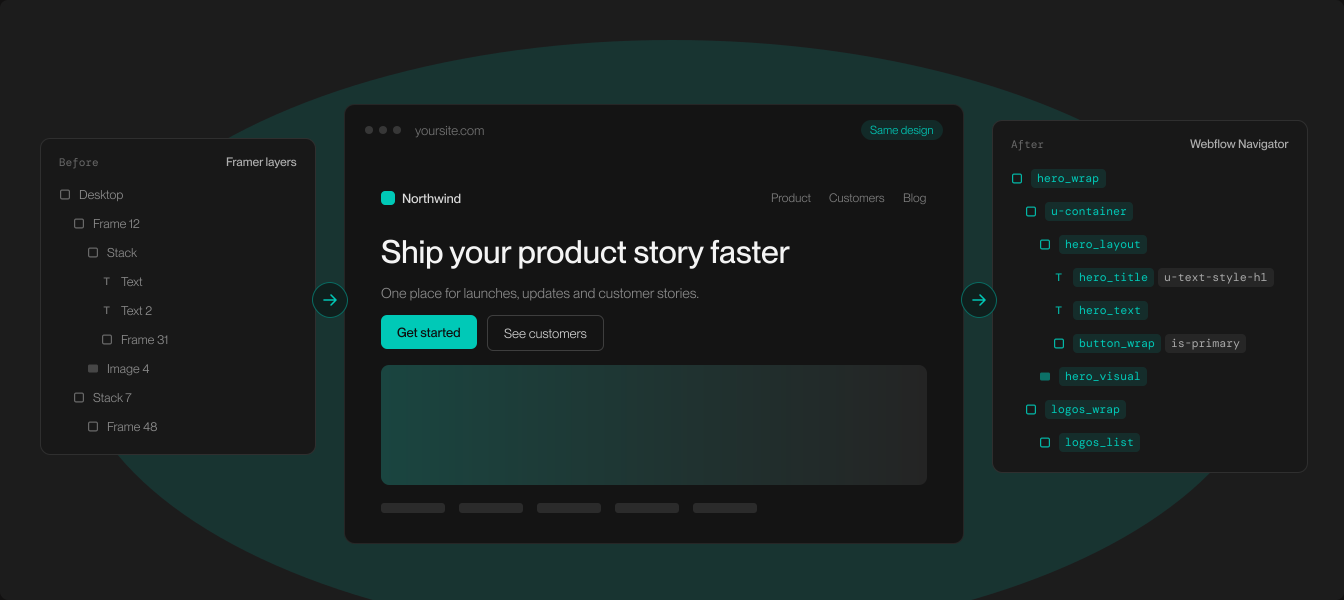

What comes across from Framer
Your design, content and search visibility moved into a Webflow site built to grow.
Your design, faithfully rebuilt
Layouts, type, spacing and breakpoints recreated in Webflow on a consistent class system, so visitors won’t notice the switch.
CMS collections and relationships
Framer CMS items moved into Webflow collections, with authors, categories and related content linked through reference fields.
Interactions and animation
Scroll, hover and page-load effects rebuilt with Webflow Interactions and GSAP, kept smooth and lightweight.
SEO settings and redirects
Page titles, descriptions, social images and URLs carried over, with 301 redirects for anything that moves.
How it works
Audit your Framer site
I’ll review every page, component and CMS collection, and note the interactions that need rebuilding.
Rebuild in Webflow
I’ll recreate the design as reusable components, set up related CMS collections and import your content.
Redirect, test and launch
I’ll map redirects for any changed URLs, test every breakpoint and interaction, and switch your domain over on launch day.
Is this the right fit?
This is for teams whose Framer site has outgrown its first version and who need a CMS and build that can scale with their content and team.
- Keep the design you’ve already invested in.
- Structure content with related CMS collections.
- Give more people safe access to edit and publish.
- Keep your rankings and URLs.
- Build on a class system that’s easy to extend.
If your Framer site is a single landing page that rarely changes, Framer may still be the right home for it, and I’ll tell you so.
FAQs
How do you migrate a Framer website to Webflow?
A Framer to Webflow migration starts with an audit of your pages, components, CMS collections and interactions. I rebuild the design in Webflow on a consistent class system, import CMS content into matching collections, recreate key animations and set up 301 redirects before launch. Framer sites can’t be exported as code, so they’re rebuilt rather than converted.
Why move from Framer to Webflow?
Teams usually move when the site needs more structure than it started with: larger CMS collections with relationships between them, finer control over SEO and code, more editors with defined roles, or a build a wider team can extend. Webflow is built around a structured CMS and class system that scales as content grows.
Can you keep my Framer design the same in Webflow?
Yes. Layouts, typography, colour, spacing and breakpoints are recreated in Webflow to match your Framer site, so visitors won’t notice the switch. Where it helps, I’ll suggest small improvements, but nothing changes without your agreement.
Can Framer animations be rebuilt in Webflow?
Most can. Scroll effects, hover states, page transitions and load animations are rebuilt with Webflow Interactions, using GSAP for more complex motion. I’ll flag any effect that needs a different approach during the audit, before the build starts.
Can you move Framer CMS content to Webflow?
Yes. Framer CMS collections can be exported as CSV and imported into Webflow CMS collections. I map each field to the right Webflow field type, rebuild relationships with reference fields and check every item’s images, slugs and SEO fields after import.
Will moving from Framer to Webflow affect my SEO?
Handled properly, it shouldn’t. I carry over page titles, meta descriptions, social images and content, keep URLs the same where possible and add 301 redirects for any that change. After launch I submit a new sitemap in Google Search Console and check for crawl errors.
Is Webflow harder to edit than Framer?
For everyday updates, no. Your team edits text, images and CMS items directly on the page in Webflow, much like in Framer. The difference is underneath: Webflow’s class system and components keep larger sites consistent as more people work on them.
How long does a Framer to Webflow migration take?
It depends on the number of pages, how many CMS collections are moving and how complex the interactions are. A small marketing site moves faster than one with a large CMS and custom animation. You’ll get a timeline once I’ve audited your Framer site.
“We launched a new specialist, boutique tax advisory business in March 2025 and Matt created our website. Matt’s service and end product was exceptional, meeting with our design and timing requirements and being highly responsive during the process. Would highly recommend.”
James PilbeamLumentis Partners


